
LinkedIn Profile Optimization: The Algorithm-First Guide for 2026

I've reviewed hundreds of LinkedIn profiles over the past three years, and I keep seeing the same mistake: people treat their profile like a static resume. They fill in their job titles, add a photo, and walk away. Then they wonder why recruiters never find them.
Here's the truth most guides won't tell you: LinkedIn is a search engine first and a social network second. With 95% of recruiters actively using LinkedIn to source candidates and the platform now hosting over 1.2 billion members, your profile isn't just a digital business card — it's a living document that LinkedIn's algorithm constantly evaluates, indexes, and ranks against millions of others.
In this guide, I'm going to show you exactly how LinkedIn's algorithm decides which profiles surface in recruiter searches, what your Social Selling Index (SSI) score actually measures, and how to use LinkedIn Analytics to iterate your way to the top of search results. Whether you're a career changer trying to reposition, an executive building thought leadership, or a freelancer hunting for clients, the principles are the same — and they all start with understanding the algorithm.
How LinkedIn's Algorithm Actually Ranks Your Profile
Before you change a single word on your profile, you need to understand the machine that decides who sees it. LinkedIn's profile ranking system operates on a pipeline that looks roughly like this:
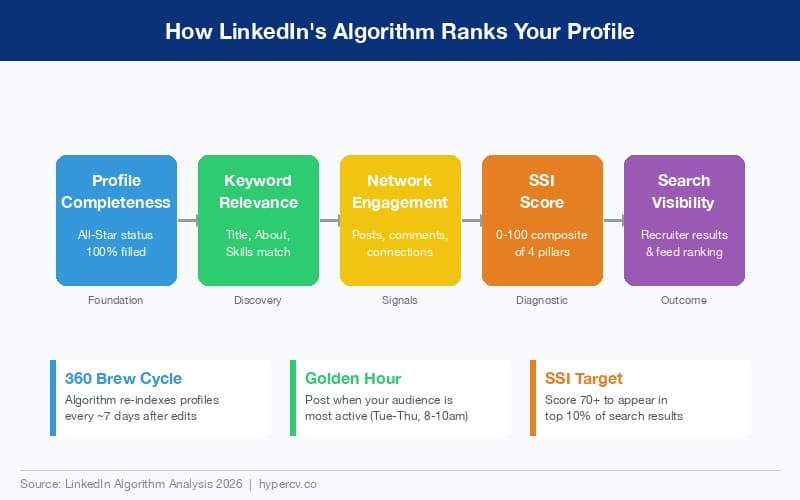
The Five-Stage Ranking Pipeline
1. Profile Completeness (Foundation) LinkedIn assigns every profile a completeness tier: Beginner, Intermediate, Advanced, Expert, and All-Star. Only All-Star profiles get full algorithmic consideration in search results. This means every section — headline, about, experience, education, skills, and featured — needs substantive content. I've seen profiles jump from page 5 to page 1 in recruiter search results simply by reaching All-Star status.
2. Keyword Relevance (Discovery) LinkedIn's search engine uses TF-IDF style keyword matching across your headline, about section, experience descriptions, and skills list. When a recruiter searches "product manager SaaS B2B," the algorithm scores your profile against those exact terms. The profiles with the highest keyword density in the right fields win. I'll show you exactly where to place keywords shortly.
3. Network Engagement (Signals) The algorithm tracks how actively you participate on the platform. Posting, commenting, sharing, and even sending messages all generate engagement signals. These signals tell LinkedIn that you're a real, active professional — not a ghost profile that hasn't logged in since 2019.
4. SSI Score (Diagnostic) Your Social Selling Index is a 0-100 composite score that LinkedIn calculates from four pillars. Think of it as your algorithmic health check. Most people don't even know this score exists, but it directly correlates with your search visibility. More on this in the next section.
5. Search Visibility (Outcome) The final output: where you land in recruiter searches and how often your content appears in your network's feed. This isn't random. It's the cumulative result of the four stages above.
The 360 Brew Cycle and Golden Hour
Two algorithm behaviors are worth understanding:
-
The 360 Brew Cycle: After you make significant profile edits, LinkedIn re-indexes your profile within approximately 7 days. During this window, the algorithm reassesses your keyword relevance and completeness. This means you should make strategic edits in batches rather than tweaking one word at a time.
-
Golden Hour Posting: LinkedIn's feed algorithm gives disproportionate weight to engagement received in the first 60-90 minutes after you post. Posts published Tuesday through Thursday between 8-10 AM in your audience's timezone consistently outperform other time slots. If you're trying to build engagement signals, timing matters as much as content quality.
Your SSI Score: The Metric Nobody Talks About
You can check your Social Selling Index right now at linkedin.com/sales/ssi. Go ahead — I'll wait. Most people score between 30 and 50 on their first check. Top performers in competitive industries score 75+.
Your SSI is built from four equally weighted pillars (each worth 25 points):
| SSI Pillar | What It Measures | How to Improve |
|---|---|---|
| Establish Your Professional Brand | Profile completeness, content publishing, post engagement | Complete all profile sections, publish 2+ articles/month |
| Find the Right People | Quality of search activity and profile views | Use LinkedIn search daily, view profiles in your target industry |
| Engage with Insights | Content sharing, commenting, reaction patterns | Comment meaningfully on 5+ posts daily, share industry news |
| Build Relationships | Connection acceptance rate, InMail response, network growth | Send personalized connection requests, respond to all messages |
Why your SSI matters: According to LinkedIn's own data, professionals with an SSI score above 70 generate 45% more opportunities than their peers and are 51% more likely to hit quota (for sales professionals). For job seekers, a high SSI means your profile appears in more recruiter searches and your content reaches a wider audience.
My recommendation: Check your SSI monthly and track which pillar is your weakest. Focused improvement on your lowest pillar will move your overall score faster than spreading effort evenly across all four.
Optimizing Every Section of Your Profile
Now that you understand what the algorithm looks for, let's optimize each section of your profile strategically. According to Forbes' analysis of LinkedIn's evolving algorithm, profiles that align with algorithmic signals see dramatically higher engagement and visibility.
Headline: Your 220-Character Billboard
Your headline is the single most important piece of text on your profile. It appears in search results, connection requests, comments, and posts. The algorithm gives it heavy keyword weight.
Bad headline: "Marketing Manager at Acme Corp" Good headline: "B2B SaaS Marketing Manager | Demand Gen & Content Strategy | Helping Tech Companies Scale Pipeline 3x"
The formula I recommend: [Target Role] | [Key Skills/Specialties] | [Value Proposition]
Use all 220 characters. Front-load your most important keywords because LinkedIn truncates headlines in many views. If you're a career changer, lead with the role you want, not the one you have.
Professional Photo and Banner
Profiles with professional photos get 21x more profile views and 9x more connection requests than those without. Your photo should:
- Show your face filling roughly 60% of the frame
- Use good lighting with a clean background
- Match the professional norms of your target industry
Your banner image (1584x396 pixels) is free real estate that most people waste with the default blue gradient. Use it to communicate your value proposition, showcase your company, or display a key achievement. Think of it as a billboard that every profile visitor sees.
About Section: Your Keyword-Rich Story
The About section is where most people either write nothing or paste their resume summary. Both approaches miss the point. This is your highest-impact keyword field after your headline, and it's also where you build a human connection with the reader.
I recommend structuring your About section in three paragraphs:
-
Hook + Value Proposition (2-3 sentences): What you do and who you help. Lead with impact, not job history. Weave in your primary keywords naturally.
-
Evidence + Specialties (3-4 sentences): Specific achievements with numbers. List your core competencies. This is where you load secondary keywords. If you need help crafting a compelling professional summary, the same principles that work for resumes apply here — lead with outcomes, not responsibilities.
-
Call to Action (1-2 sentences): Tell the reader what to do next. "Open to conversations about..." or "Reach out if you're looking for..." This increases InMail response rate, which feeds your SSI.
Include your email address or a booking link. Make it easy for recruiters to contact you outside LinkedIn.
Experience Section: Achievements, Not Duties
Each role in your Experience section should read like a highlight reel, not a job description. Use the CAR format (Challenge-Action-Result) for each bullet point:
- Challenge: "Inherited a stagnant content program with declining organic traffic"
- Action: "Redesigned content strategy around pillar pages and programmatic SEO"
- Result: "Grew organic traffic 340% in 18 months, generating $2.1M in pipeline"
The algorithm indexes every word in your experience descriptions, so include relevant keywords naturally. But remember that recruiters also read these — the skills and language you use matter more than you think for making a strong impression.
Skills Section: Your Keyword Arsenal
LinkedIn lets you list up to 50 skills, and you should use every single slot. Here's why: skills are one of the primary keyword fields the algorithm uses for search matching. When a recruiter searches for "data analysis," LinkedIn checks your skills list alongside your headline and about section.
Strategy for maximizing skills:
- List your top 3 skills first (these are pinned and get endorsement requests)
- Include exact-match keywords that recruiters search for
- Add both specific skills ("Python") and broad skills ("Data Science")
- Request endorsements from colleagues — endorsed skills rank higher
- Take LinkedIn Skill Assessments to earn badges on verified skills
Featured Section: Your Portfolio
The Featured section sits prominently below your About and is perfect for showcasing:
- Published articles or blog posts
- Presentation decks
- Project case studies
- Links to your portfolio or professional resume templates
- Media appearances or speaking engagements
Profiles with a populated Featured section see higher dwell time (how long visitors stay on your profile), which sends positive signals to the algorithm.
The LinkedIn Profile Optimization Checklist
Use this checklist to audit your profile systematically. I recommend going through it section by section rather than trying to do everything at once.
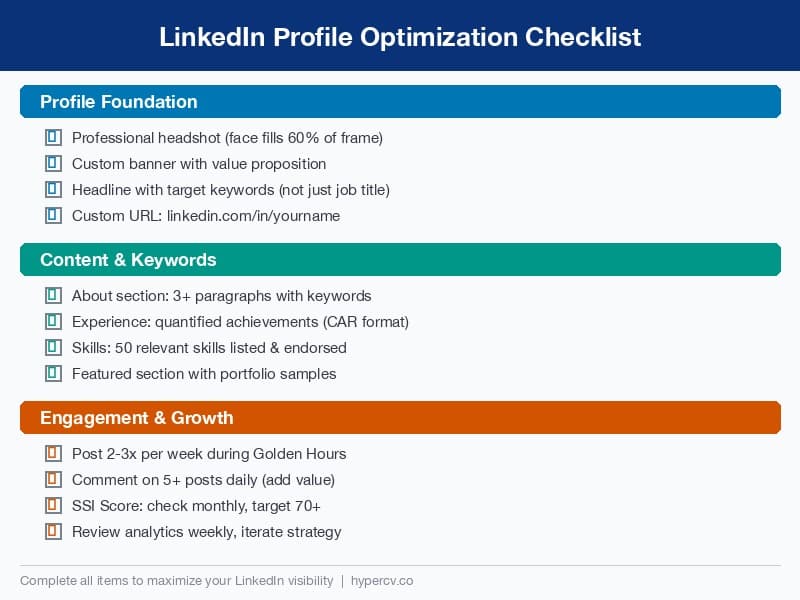
| Section | Action Item | Priority | Status |
|---|---|---|---|
| Photo | Upload professional headshot (face fills 60% of frame) | High | ☐ |
| Banner | Custom banner with value proposition or branding | High | ☐ |
| Headline | Include target keywords + value prop (use all 220 chars) | Critical | ☐ |
| URL | Customize to linkedin.com/in/yourname | Medium | ☐ |
| About | 3 paragraphs: hook, evidence, CTA with keywords | Critical | ☐ |
| Experience | CAR-format bullets with quantified achievements | High | ☐ |
| Skills | 50 skills listed, top 3 pinned, assessments taken | High | ☐ |
| Featured | 3-6 items showcasing best work | Medium | ☐ |
| Education | Complete with activities, honors, relevant coursework | Medium | ☐ |
| Recommendations | Request 3+ recommendations from diverse sources | Medium | ☐ |
| Engagement | Post 2-3x/week, comment on 5+ posts daily | High | ☐ |
| SSI Check | Review SSI score monthly, target 70+ | Medium | ☐ |
| Analytics | Review profile analytics weekly, iterate | High | ☐ |
Persona-Specific Strategies
For Career Changers
Your biggest challenge is the keyword gap: your past experience uses different terminology than your target role. Bridge this gap by:
- Leading your headline with the role you're targeting, not your current title
- Using your About section to explicitly narrate your career transition story
- Adding target-industry skills even if you acquired them through courses or side projects
- Publishing 2-3 articles about your new field to build topical authority
If your resume still reflects your old career, you might be getting skipped by hiring managers for reasons you haven't considered. Align both your resume and LinkedIn profile around your target role simultaneously.
For Executives and Senior Leaders
At the executive level, LinkedIn optimization shifts from keyword stuffing to thought leadership signaling:
- Your headline should emphasize transformation outcomes ("Scaled SaaS company from $5M to $50M ARR")
- Your About section should read like a leadership philosophy, not a career summary
- Publish long-form content monthly — the algorithm rewards consistent publishing from established profiles
- Engage with C-suite peers' content to build network density in leadership circles
For Freelancers and Consultants
Your profile is your storefront. Optimize for conversion:
- Use "Open to" settings for providing services
- Headline formula: "[Specialty] for [Target Client] | [Key Result You Deliver]"
- Featured section should showcase client results and testimonials
- Turn on Creator Mode to access LinkedIn newsletters and live video
Using LinkedIn Analytics to Iterate
Here's where most guides stop, and where the real advantage begins. LinkedIn gives you a powerful analytics dashboard — use it.
Key Metrics to Track Weekly
Search Appearances: This tells you how many times your profile appeared in LinkedIn searches. Track this weekly. If it's trending down, your keywords need refreshing. If it spikes after profile edits, you've hit the right keywords.
Profile Views: Monitor who's viewing your profile. LinkedIn shows you viewer demographics including job titles, companies, and locations. If the wrong people are finding you, your keywords are attracting the wrong audience.
Post Impressions and Engagement Rate: For each post, track impressions (how many people saw it) and engagement rate (reactions + comments / impressions). Engagement rates above 3% are strong. Above 5% is exceptional. Use this data to double down on content formats and topics that resonate.
Content Suggestions from Analytics: LinkedIn now surfaces "Topics your audience is interested in" within the analytics dashboard. Use these suggestions to plan your content calendar around what your specific network wants to read about.
The Monthly Iteration Cycle
I recommend a monthly review process:
- Week 1: Check SSI score. Identify your weakest pillar. Set a specific goal for that pillar.
- Week 2: Review search appearances and profile views. Are the right people finding you? Adjust keywords if needed.
- Week 3: Analyze your top-performing posts from the past month. Identify patterns in topic, format, and timing.
- Week 4: Make strategic profile edits based on your analysis. Remember the 360 Brew Cycle — batch your changes to trigger a re-index.
Privacy Settings That Affect Visibility
A quick but important note on settings most people overlook:
- "Open to Work" frame: Visible to all or recruiters only. If you're employed, set to "Recruiters only" to avoid awkward conversations with your current employer.
- Profile viewing mode: Always browse LinkedIn in "public" mode so others can see you viewed their profile. This drives reciprocal views and increases your profile view count.
- Connection visibility: Keep your connections list public. A large, visible network signals credibility to the algorithm and to human visitors.
- Creator Mode: Turning this on changes your "Connect" button to "Follow," which can either help or hurt depending on your goal. If you want more connections (job seekers), leave it off. If you want followers (thought leaders), turn it on.
Putting It All Together
LinkedIn profile optimization isn't a one-time project. It's an ongoing process of understanding what the algorithm rewards, making strategic edits, measuring results, and iterating. The professionals who dominate LinkedIn search results aren't necessarily more qualified than you — they've just learned to speak the algorithm's language.
Start with the checklist above. Get to All-Star profile status. Check your SSI score and identify your weakest pillar. Then commit to a weekly engagement rhythm and monthly analytics review. Within 90 days, you should see a measurable increase in search appearances, profile views, and inbound opportunities.
The algorithm rewards consistency and completeness. Give it both, and it will put your profile in front of the people who matter most to your career.
Ready to align your resume with your optimized LinkedIn profile? Explore HyperCV's professional templates to create a resume that matches the same keywords and positioning you've built on LinkedIn.